


How They Work, Setup Steps, and Why They Beat Physical SIM Cards
International travel has changed dramatically in the last few years — not because of cheaper flights or bigger suitcases, but because of a tiny technology built directly into your smartphone: the esim for international travel.
If you’ve ever landed in another country, turned off airplane mode, and immediately felt the sting of roaming fees, or scrambled to find a local SIM card vendor in a crowded airport, this guide is for you.
Whether you’re a first-time traveler, a digital nomad, or simply curious about how eSIMs work, this is the Ultimate Beginner’s Guide to Travel eSIMs — how they work, how to set them up, and why they’re replacing physical SIM cards for travelers worldwide.
What Exactly Is a Travel eSIM?
An eSIM (embedded SIM) is a digital version of the physical SIM card used to connect your phone to a mobile network. Instead of inserting a plastic chip, an eSIM is built into your device, and you activate it by scanning a QR code or entering a simple activation code.
Think of an eSIM as a downloadable phone plan.
With a travel eSIM from providers like OneSimCard, you can:
-
Activate international data instantly
-
Switch countries without swapping SIM cards
-
Avoid expensive roaming fees
-
Use multiple plans on a single device
-
Keep your home number active while using foreign data
It’s convenience, flexibility, and savings — all packed into one digital profile.
How Travel eSIMs Work (The Simple Version)
Here’s the basic idea:
-
Every eSIM-enabled phone contains a secure chip inside.
-
When you buy a travel eSIM plan, you receive a QR code or activation code.
-
Your phone uses this code to download a mobile profile created by the provider.
-
That profile tells your phone which network to connect to in each country.
There’s no shipping, no waiting, no physical installation, and no need to visit a store.
This is why eSIMs have become the new gold standard for international travel.
What Do You Need to Use an esim for international travel?
Most modern smartphones support eSIM technology.
iPhone:
-
XS, XR, 11, 12, 13, 14, 15 and newer
(U.S. iPhone 14+ models are eSIM-only — no SIM tray at all!)
Android:
-
Google Pixel 4 and newer
-
Samsung Galaxy S20, S21, S22, S23
-
Samsung Z Flip / Fold
-
Many Motorola, Xiaomi, Oppo, and Huawei devices
If your phone is relatively new, there’s a good chance it supports eSIM.
To check, open:
Settings → Cellular → Add eSIM / Add Mobile Plan
If you see that option, you’re ready to go.
✈️ Why Travelers Are Switching to eSIMs
Before we get into setup steps, let’s talk about why eSIMs have become a traveler’s best friend.
1. Instant Activation
You can install a travel eSIM before you leave home, so your phone connects immediately when you land.
No more:
-
Hunting for airport kiosks
-
Dealing with language barriers
-
Swapping tiny SIM cards while jet-lagged
2. No Roaming Fees
Traditional carriers charge shocking roaming rates.
Travel eSIMs connect you to local networks at local prices — sometimes saving 80% or more.
3. Multiple Plans, Zero Hassle
Your phone can hold multiple eSIM profiles.
Want one for Europe and another for Asia? Easy.
Want a backup plan for emergencies? Done.
4. Keep Your Home Number Active
Because eSIMs free up your SIM tray (or eliminate the need entirely), you can continue receiving calls and texts on your regular number — while using your travel eSIM for data.
5. No Physical SIM to Lose
No more losing tiny SIM cards, misplacing ejector tools, or accidentally damaging your tray.
6. More Secure Than Physical SIMs
eSIMs can’t be cloned, swapped, or stolen like removable SIM cards.
This reduces the risk of SIM swapping attacks — a growing cybersecurity concern.
️ How to Set Up a Travel eSIM (Step-by-Step)
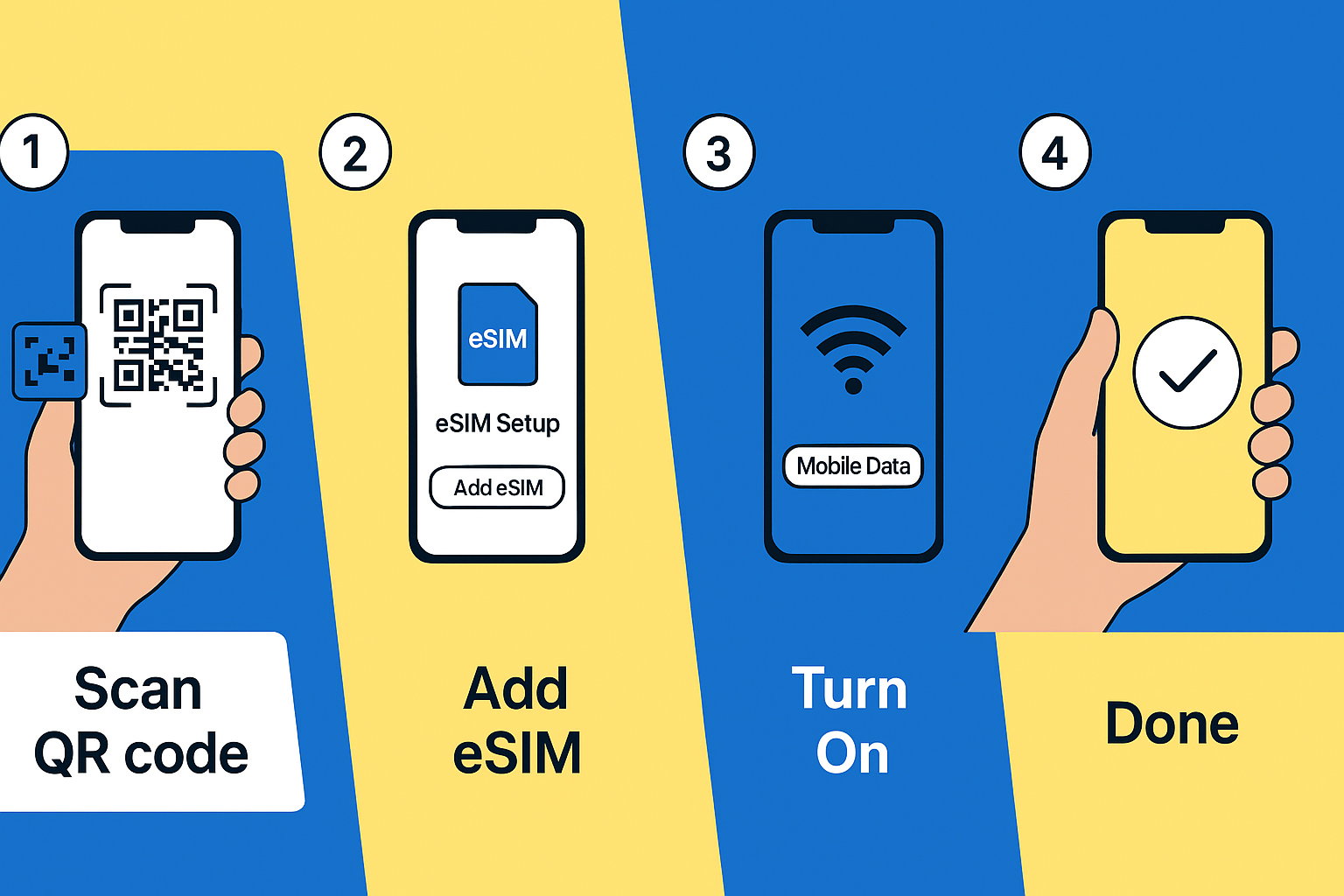
Setting up an eSIM is easier than setting up a new app.
Here’s the fastest method used by most travelers:
Step 1: Buy Your Travel eSIM Plan
Purchase from a trusted provider like OneSimCard.
You’ll receive:
-
A QR activation code
-
Manual activation details
-
Setup instructions
Step 2: Connect to Wi-Fi
This is important — eSIM installation requires internet access.
Step 3: Open Your Phone’s eSIM Menu
iPhone:
Settings → Cellular → Add eSIM (or Add Cellular Plan)
See a step-by-step video guide here: iPhone Installation Guide
Android:
Settings → Connections → SIM Manager → Add eSIM
See a step-by-step video guide here: Android Installation Guide
Step 4: Scan the QR Code
Hold your phone over the QR code.
Your device will begin downloading the eSIM profile.
Step 5: Turn on Your New Plan
Enable:
-
Turn On This Line
-
Data Roaming (required for travel eSIMs)
-
Set as Primary Data Line (optional)
Step 6: Test Your Connection
Once activated, you should see:
-
Signal bars
-
“LTE” or “5G”
-
Network name (depending on country)
You’re ready to go!
Advanced Users: Switching Between eSIM Profiles
One of the most underrated eSIM features is the ability to store multiple profiles (although with OneSimCard, you can just use our eSIM over and over for years because the eSIM doesn’t expire).
You can:
-
Turn eSIM profiles on/off
-
Name each plan (e.g., “Europe Trip”)
-
Switch between plans instantly
-
Leave inactive profiles installed for future trips
This makes eSIMs perfect for:
-
Frequent flyers
-
Digital nomads
-
Cross-border workers
-
Cruise travelers
-
Snowbirds
It’s like having several SIM cards in your pocket — without the clutter.
⚖️ eSIM vs. Physical SIM: Why eSIMs Win Every Time
Here’s a quick comparison:
| Feature | eSIM | Physical SIM |
|---|---|---|
| Instant activation | ✅ Yes | ❌ Requires pickup/store |
| Can’t be lost | ✅ Yes | ❌ Easy to lose |
| Secure against SIM swaps | ✅ Yes | ❌ Vulnerable |
| Multiple plans | ✅ Yes | ❌ Only one at a time |
| No tiny card to handle | ✅ Yes | ❌ Requires tools |
| Remote provisioning | ✅ Yes | ❌ Must insert manually |
When you compare point-by-point, it’s easy to see why the travel industry is moving quickly toward eSIM-only devices.
Why OneSimCard Is the Best Travel eSIM for Beginners
OneSimCard takes the guesswork out of travel connectivity:
-
Instant QR activation
-
Coverage in 200+ countries
-
Multi-network redundancy for stronger signal
-
No contracts or subscriptions
-
Affordable plans — from light usage to heavy data
-
Optional voice calling and SMS via OneSim VoIP
Whether you need a simple plan for a weekend trip or a reliable multi-country solution for a 6-month adventure, OneSimCard delivers.
Ready to Try a Travel eSIM?
Travel eSIMs are the future — and they’re already making international adventures cheaper, easier, and more secure.
You no longer need to juggle plastic SIM cards or fear roaming charges.
With a travel eSIM, your phone “just works” wherever you go.
Activate your OneSimCard Travel eSIM now and experience borderless connectivity.