
eSIM for Egypt in 2026: What Works, WhatsApp Calling & Coverage

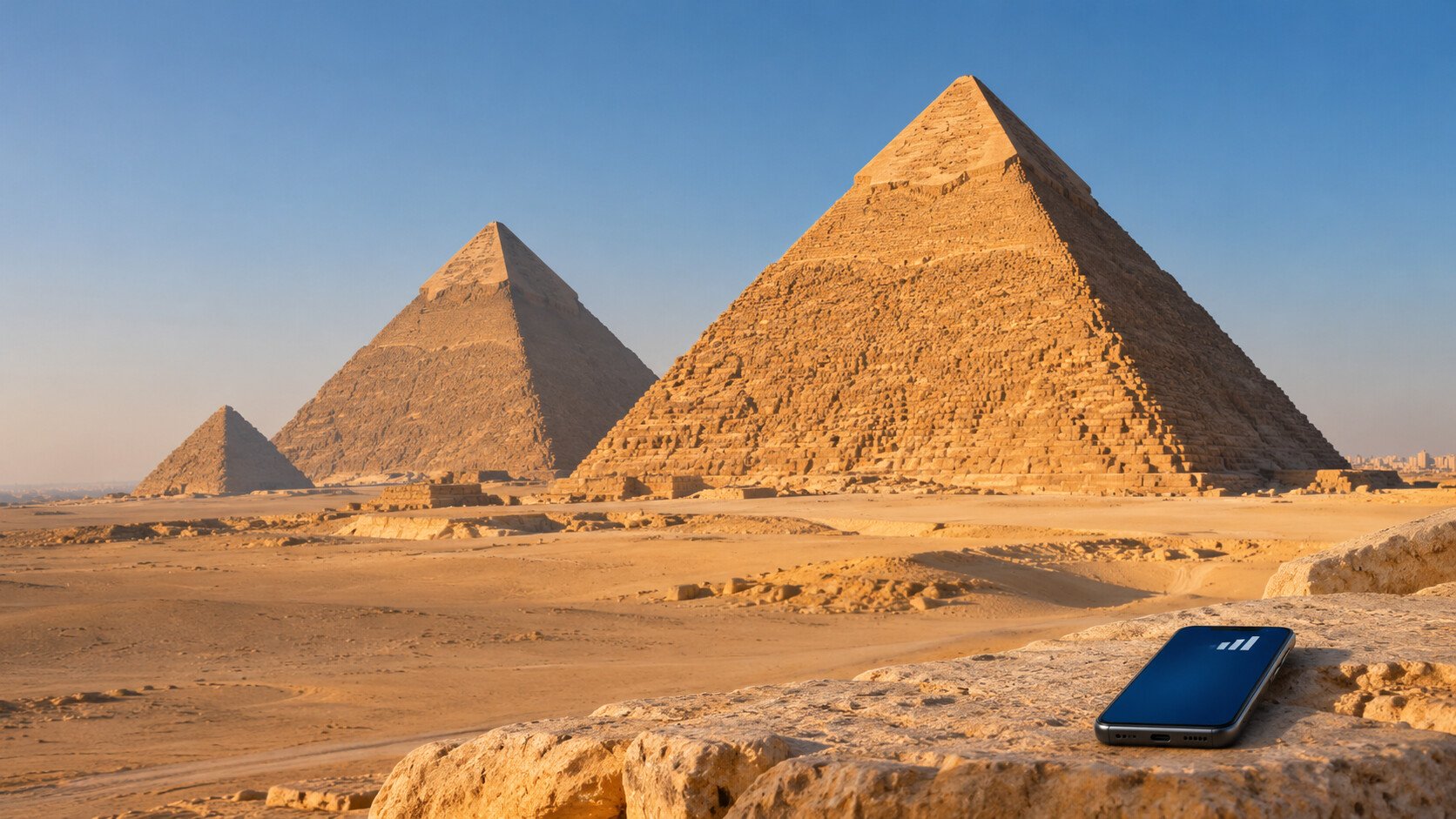
Egypt travel eSIM with smartphone and cellular signal overlooking the Pyramids of Giza.

From the Pyramids of Giza to a Nile cruise or the beaches of the Red Sea, staying connected in Egypt should be easy. But there is one important complication travelers often discover too late: WhatsApp, FaceTime, and other internet calls may not work as expected on Egyptian networks. Here is how to choose an Egypt eSIM, understand the calling limitations, and get online without the airport SIM-card line.

Egypt eSIM: the quick answer

Yes, an international travel eSIM can provide mobile data in Egypt for maps, messaging, rides, email, and browsing. WhatsApp messages usually work, but voice and video calling can be restricted. An internationally routed connection may behave differently from a local one, but no eSIM should be assumed to bypass these restrictions without testing or provider confirmation.

Do WhatsApp and FaceTime calls work in Egypt?

Not always. Egypt has a history of restricting or throttling internet-based voice and video calling, sometimes called VoIP. WhatsApp text messages, photos, and voice notes can work even when live calls fail or become unreliable.

The situation is more nuanced than a complete nationwide ban. Reuters reported that Egypt has throttled WhatsApp calls rather than maintaining a blanket ban. Freedom House also documented continuing VoIP restrictions in its 2025 report. Actual calling results can vary by network, app, and connection—including hotel Wi-Fi.

What to expect from your apps

  • WhatsApp messaging: Text, photos, and voice notes generally work with a data connection.
  • WhatsApp voice/video calls: May fail, disconnect, or have reduced quality.
  • FaceTime and Messenger calls: Can be affected by similar restrictions.
  • Regular phone calls and SMS: Depend on your home carrier or the voice service associated with your SIM; a data-only eSIM does not automatically provide a traditional phone number.

Can a travel eSIM help with restricted internet calls?

Possibly—but the distinction is how the data connection is routed, not whether the SIM is physical or digital. Some travel eSIM services use international roaming arrangements that route internet traffic through another country. In certain circumstances, this may change which network-level restrictions apply.

However, international roaming is not a guarantee that WhatsApp or FaceTime calls will work. Some eSIM plans use local internet breakout or otherwise remain subject to restrictions. If calling home through a particular app is essential, ask the provider about its routing and calling experience in Egypt, and have a backup calling option.

Why choose a travel eSIM instead of buying a local SIM?

The big advantage is convenience. You can purchase and install a travel eSIM before departure, then connect after arrival without visiting a mobile-phone kiosk.

Buying a local Egyptian SIM or eSIM generally involves identity verification, usually with a passport for foreign visitors. A prepaid travel eSIM purchased from an international provider generally avoids that in-country registration step, though the provider may have its own verification requirements.

Importantly, Egyptian operators do offer eSIMs now. For example, Orange Egypt says tourists are eligible for eSIM service, although new-line activation may require a shop visit and identity checks. So the choice is really about convenience and plan features—not whether local eSIM technology exists.

Which mobile networks have coverage in Egypt?

Egypt’s four main mobile operators are Vodafone Egypt, Orange Egypt, e& Egypt (formerly Etisalat), and WE. Coverage is generally strongest in populated areas and popular travel corridors, including Cairo, Alexandria, Luxor, Aswan, Hurghada, and Sharm El Sheikh. Service can become less dependable in remote desert areas, parts of Sinai, and on long stretches between towns.

Don’t assume every travel eSIM can access all four networks. Available partner networks depend on the specific SIM and plan. For example, OneSimCard’s Egypt coverage page lists Orange Egypt and Etisalat Egypt for the DataMax eSIM. Check your exact product’s coverage before purchasing, especially if you plan to travel beyond the major tourist destinations.

How much data do you need for Egypt?

Your ideal plan depends on how often you use maps, upload photos, stream video, or share a hotspot. These are practical estimates, not fixed usage limits:

Travel style Typical use Estimated data
Light Maps, messaging, occasional browsing About 1 GB/week
Everyday Maps, social media, photo uploads, occasional calls About 3–5 GB/week
Heavy Streaming, frequent video uploads, hotspot, remote work 1 GB/day or more

Live audio and video calls use more data than messaging, and short-form videos can use data quickly. If you intend to call home daily where calling works, allow extra data rather than buying the smallest plan.

Why WhatsApp still matters for travel in Egypt

WhatsApp is a convenient way to communicate with hotels, drivers, tour guides, and local contacts. You may find yourself using it to confirm pickup times, share your location, or arrange an excursion. Because messages and voice notes are different from live calls, you can often stay in touch even if an internet call won’t connect.

Before departure, save essential phone numbers, hotel addresses, booking details, and offline maps. These small steps are especially helpful if your trip includes remote sites or long drives.

Set up your Egypt eSIM before you fly

Installing your eSIM while you still have reliable Wi-Fi makes arrival much smoother. Follow your provider’s instructions, especially regarding when the plan starts and whether installation is different from activation.

  1. Check compatibility: Confirm that your phone is unlocked and supports eSIM. Many recent iPhones, Google Pixels, and Samsung Galaxy models do, but support varies by model and region.
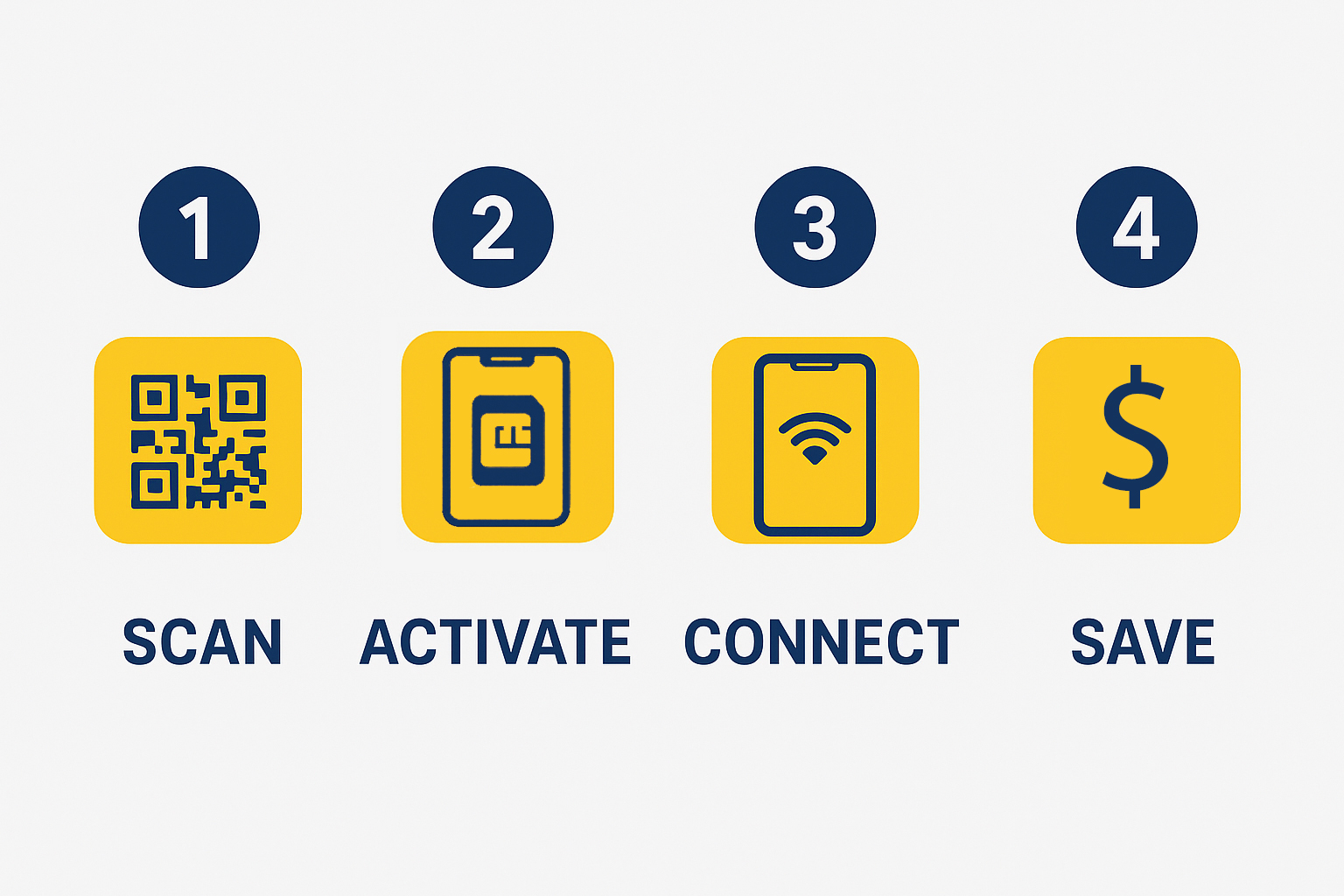
  2. Install over Wi-Fi: Add the eSIM using your provider’s QR code or instructions before leaving home, if supported.
  3. On arrival, choose your data line: Set the travel eSIM as the preferred line for cellular data.
  4. Check roaming settings: Enable data roaming on the travel eSIM if the provider requires it. Disable data roaming on your regular line to reduce the chance of unexpected charges.
  5. Test your connection: Open a map, send a WhatsApp message, and—if important—try an app call while you still have a fallback connection.

Keep your home number available. On a compatible dual-SIM phone, your regular number may remain active for verification texts while your eSIM handles data. Ask your home carrier about roaming charges for calls and SMS, and remember that keeping both lines active depends on your phone’s capabilities.

Egypt eSIM FAQs

Can I use WhatsApp in Egypt with a travel eSIM?

Yes, messaging, photos, and voice notes generally work. Voice and video calls can be unreliable or restricted depending on the connection. A travel eSIM does not automatically guarantee calling access.

Do I need a passport to use an Egypt eSIM?

A travel eSIM purchased internationally usually does not require the same Egyptian in-person SIM registration process. Local Egyptian SIM and eSIM purchases generally require identity verification, often with a passport.

Can I use my regular phone number alongside the eSIM?

On a compatible dual-SIM phone, yes. You can often use the travel eSIM for mobile data and keep your primary number available for texts and calls, subject to your home carrier’s roaming rules.

Will one eSIM work across Cairo, Luxor, and the Red Sea?

Many travel eSIMs cover these popular destinations, but signal strength varies by location and the partner network assigned to your plan. Check the provider’s Egypt network list and download offline maps as a backup.

The bottom line

For most visitors, an international travel eSIM is one of the simplest ways to get data in Egypt without buying a local SIM on arrival. Choose a plan with coverage in the places you’ll visit, enough data for your travel style, and clear setup instructions. Treat app calling as something to verify—not something any provider can promise purely because its eSIM works in Egypt.

Stay connected across Egypt with OneSimCard DataMax

Explore DataMax eSIM coverage and available data rates for Egypt before your trip. Set up in advance so you can spend less time arranging connectivity and more time exploring.

See Egypt DataMax Rates & Coverage →

Information about app restrictions and mobile services can change. For background, see Freedom House, Reuters, and Orange Egypt’s eSIM information.
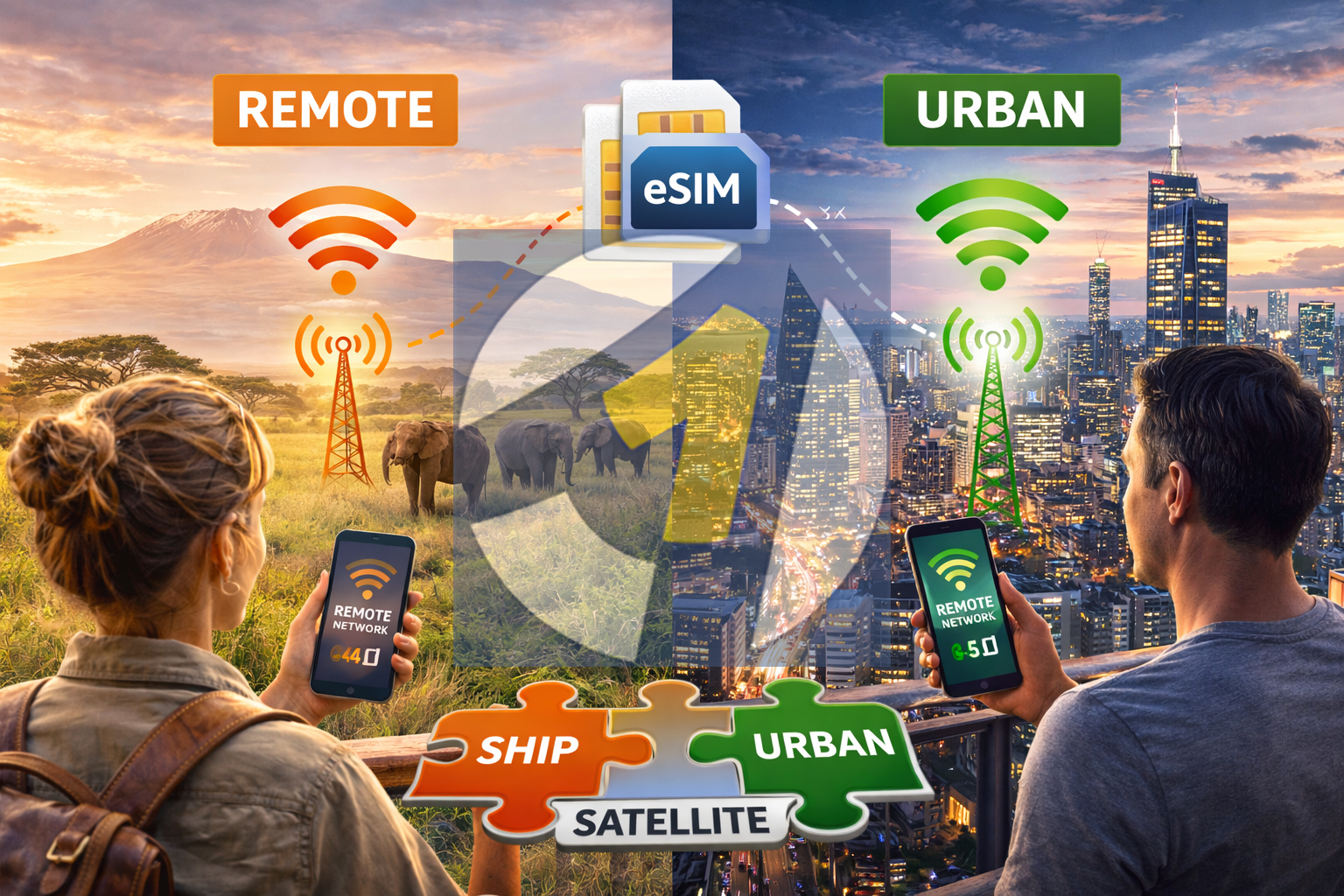
From Safari to Skyscrapers: How eSIMs Perform in Remote vs Urban Destinations

eSIMs keep you connected from safari to skyscrapers

A wild vs. wired comparison journey

Travel has always been about contrast. One day you’re watching elephants cross a dusty African plain, the next you’re navigating a subway beneath glass towers and neon lights. Modern travelers move between worlds that couldn’t look more different, yet one tool now follows them everywhere: their smartphone.

Whether you’re posting photos from a safari lodge or navigating the streets of Tokyo, connectivity plays a critical role in the travel experience. And with the rise of eSIM technology, staying connected across wildly different environments has become easier than ever.

But how do eSIMs actually perform in these extremes? Does the same digital SIM that works in a dense city also work in remote wilderness?

Let’s explore the difference between wild landscapes and wired cities, and how eSIM connectivity adapts across both.


The Urban Jungle: Connectivity in Skyscraper Cities

Cities are the natural habitat of mobile networks.

Urban areas have dense infrastructure: cellular towers on rooftops, small cells on streetlights, fiber lines running beneath sidewalks. Carriers compete heavily in metropolitan markets, meaning faster speeds and wider coverage.

In places like New York, London, Seoul, or Singapore, smartphones rarely struggle to find a signal.

When using an eSIM in a major city, travelers often experience:

  • Strong multi-network coverage

  • Fast 4G and 5G speeds

  • Reliable indoor connectivity

  • High data capacity for streaming and uploads

Because many travel eSIMs partner with multiple local carriers, your phone can often connect to the strongest available network automatically. Instead of being locked to one provider, your device essentially “network hops” to maintain the best signal.

For digital nomads, influencers, and business travelers, this means the urban environment is where eSIMs truly shine.

Uploading photos from a rooftop bar? Instant.

Joining a video call from a café? No problem.

Streaming a live city tour for followers? Smooth and stable.

In cities, connectivity becomes so seamless that most travelers forget about it entirely. And that’s exactly the point.


The Wilderness Test: Connectivity on Safari

Now imagine a very different scene.

You’re in the Serengeti. The sun is rising over open savannah. A lion yawns in the distance. There are no skyscrapers, no subway stations, and certainly no fiber-optic cables running through the grasslands.

This is where connectivity shifts from infrastructure-driven to coverage-driven.

Remote destinations rely on fewer cellular towers spread across larger geographic areas. These towers often serve highways, villages, and tourism hubs rather than every square mile of terrain.

So how does an eSIM perform here?

Surprisingly well in many cases.

Because travel eSIM providers partner with major national carriers, your device can still connect to the same networks that serve local communities and lodges.

While speeds may be lower than in cities, travelers often still have enough connectivity for essential tasks:

  • Sending messages

  • Checking maps

  • Uploading photos

  • Accessing translation apps

  • Confirming bookings

In other words, even deep in the wild, a connection often exists. It’s simply a quieter, slower version of the urban experience.


Signal Strength: Dense Towers vs. Distant Towers

One of the biggest differences between urban and remote connectivity is tower density.

Cities may have hundreds of cellular sites packed into a few square miles. Rural areas may rely on towers that cover dozens of miles.

This affects two key factors:

Speed

Urban networks handle massive traffic with high-speed fiber backhaul. Remote networks may rely on microwave links or slower infrastructure.

Capacity

Cities support thousands of simultaneous connections. In remote areas, fewer users share the network, which sometimes offsets the infrastructure limitations.

Ironically, a safari lodge with only a handful of guests may experience stable speeds simply because there aren’t many devices competing for bandwidth.


Network Switching: A Hidden Advantage of eSIMs

One of the biggest benefits of travel eSIM technology is multi-network access.

Traditional SIM cards often lock you into one carrier. If that network has weak coverage in a certain area, your signal may drop entirely.

Many global eSIM platforms allow your phone to switch between partner networks automatically.

Imagine driving across a national park:

  • One carrier covers the highway well

  • Another carrier covers nearby villages

  • Your eSIM device switches seamlessly between them

This flexibility dramatically improves reliability when traveling through regions with uneven coverage.

For adventurers moving between cities and wilderness, this feature becomes invaluable.


Real Travel Scenario: Safari to City

Consider a traveler moving between two dramatically different environments.

Day 1–3: Safari Camp in Kenya

Connectivity is available but limited.

You wake before dawn and photograph elephants crossing a river. Back at the lodge, you upload a few photos and send messages home. The connection isn’t lightning fast, but it works reliably enough to stay in touch.

Maps still load. Messages still send.

The wilderness feels remote, but you’re never truly disconnected.


Day 4–7: Nairobi

Suddenly the digital world accelerates.

4G and 5G signals appear. Upload speeds jump dramatically. Video calls become effortless. You share safari footage, post reels, and download travel guides for the next destination.

The same eSIM profile that connected in the wild now taps into the city’s powerful network infrastructure.

No SIM swap required.

Just a stronger signal.


Power Consumption: Another Remote Factor

In remote areas, phones sometimes use more battery power because they work harder to maintain a connection with distant towers.

Your device may boost transmission power when signals are weak, which drains the battery faster.

Travelers visiting remote destinations often benefit from:

  • Portable power banks

  • Offline maps downloaded in advance

  • Data-saving settings for large uploads

But even with these adjustments, eSIM connectivity remains a valuable safety and navigation tool in remote areas.


The Role of Satellite in Extreme Locations

Some wilderness destinations go beyond cellular coverage entirely.

Deep deserts, open oceans, and polar regions may rely on satellite communication rather than traditional mobile networks.

In these rare cases, eSIMs cannot replace satellite connectivity. However, they still provide seamless coverage for the majority of travel routes leading to and from those remote areas.

Once you return within range of terrestrial networks, your eSIM reconnects automatically.


Why eSIMs Fit Modern Travel

The real strength of eSIM technology isn’t just speed or coverage.

It’s continuity.

Travelers today move constantly between environments:

  • Airports

  • Cities

  • National parks

  • Remote islands

  • Coastal villages

Each environment has its own connectivity profile. Traditional SIM cards struggle to adapt to that variety without manual switching.

eSIMs solve the problem digitally.

One installation. Multiple networks. Continuous connectivity across landscapes.


Wild vs. Wired: The Final Verdict

So how do eSIMs perform across extreme travel environments?

The answer is surprisingly consistent.

In cities, they deliver fast, high-capacity connectivity that rivals local plans. In remote regions, they connect to the same national networks that support local communities and tourism infrastructure.

The experience changes, but the connection remains.

That’s the real magic.

From safari plains to skyline views, your phone adapts to the environment just as travelers do.

Because modern exploration no longer requires choosing between adventure and connectivity.

With the right technology in your pocket, you can experience both worlds at once.

One moment you’re tracking wildlife across open savannah.

The next you’re uploading that moment from a café beneath the tallest buildings in the city.

From safari to skyscrapers, the signal travels with you.

The Ultimate Beginner’s Guide to eSIM for International Travel

Woman holding smartphone with travel eSIM

How They Work, Setup Steps, and Why They Beat Physical SIM Cards

International travel has changed dramatically in the last few years — not because of cheaper flights or bigger suitcases, but because of a tiny technology built directly into your smartphone: the esim for international travel.

If you’ve ever landed in another country, turned off airplane mode, and immediately felt the sting of roaming fees, or scrambled to find a local SIM card vendor in a crowded airport, this guide is for you.

Whether you’re a first-time traveler, a digital nomad, or simply curious about how eSIMs work, this is the Ultimate Beginner’s Guide to Travel eSIMs — how they work, how to set them up, and why they’re replacing physical SIM cards for travelers worldwide.


What Exactly Is a Travel eSIM?

An eSIM (embedded SIM) is a digital version of the physical SIM card used to connect your phone to a mobile network. Instead of inserting a plastic chip, an eSIM is built into your device, and you activate it by scanning a QR code or entering a simple activation code.

Think of an eSIM as a downloadable phone plan.

With a travel eSIM from providers like OneSimCard, you can:

  • Activate international data instantly

  • Switch countries without swapping SIM cards

  • Avoid expensive roaming fees

  • Use multiple plans on a single device

  • Keep your home number active while using foreign data

It’s convenience, flexibility, and savings — all packed into one digital profile.


How Travel eSIMs Work (The Simple Version)

Here’s the basic idea:

  1. Every eSIM-enabled phone contains a secure chip inside.

  2. When you buy a travel eSIM plan, you receive a QR code or activation code.

  3. Your phone uses this code to download a mobile profile created by the provider.

  4. That profile tells your phone which network to connect to in each country.

There’s no shipping, no waiting, no physical installation, and no need to visit a store.

This is why eSIMs have become the new gold standard for international travel.


What Do You Need to Use an esim for international travel?

Most modern smartphones support eSIM technology.

iPhone:

  • XS, XR, 11, 12, 13, 14, 15 and newer
    (U.S. iPhone 14+ models are eSIM-only — no SIM tray at all!)

Android:

  • Google Pixel 4 and newer

  • Samsung Galaxy S20, S21, S22, S23

  • Samsung Z Flip / Fold

  • Many Motorola, Xiaomi, Oppo, and Huawei devices

If your phone is relatively new, there’s a good chance it supports eSIM.
To check, open:

Settings → Cellular → Add eSIM / Add Mobile Plan
If you see that option, you’re ready to go.


✈️ Why Travelers Are Switching to eSIMs

Before we get into setup steps, let’s talk about why eSIMs have become a traveler’s best friend.

1. Instant Activation

You can install a travel eSIM before you leave home, so your phone connects immediately when you land.

No more:

  • Hunting for airport kiosks

  • Dealing with language barriers

  • Swapping tiny SIM cards while jet-lagged

2. No Roaming Fees

Traditional carriers charge shocking roaming rates.
Travel eSIMs connect you to local networks at local prices — sometimes saving 80% or more.

3. Multiple Plans, Zero Hassle

Your phone can hold multiple eSIM profiles.
Want one for Europe and another for Asia? Easy.
Want a backup plan for emergencies? Done.

4. Keep Your Home Number Active

Because eSIMs free up your SIM tray (or eliminate the need entirely), you can continue receiving calls and texts on your regular number — while using your travel eSIM for data.

5. No Physical SIM to Lose

No more losing tiny SIM cards, misplacing ejector tools, or accidentally damaging your tray.

6. More Secure Than Physical SIMs

eSIMs can’t be cloned, swapped, or stolen like removable SIM cards.
This reduces the risk of SIM swapping attacks — a growing cybersecurity concern.


️ How to Set Up a Travel eSIM (Step-by-Step)

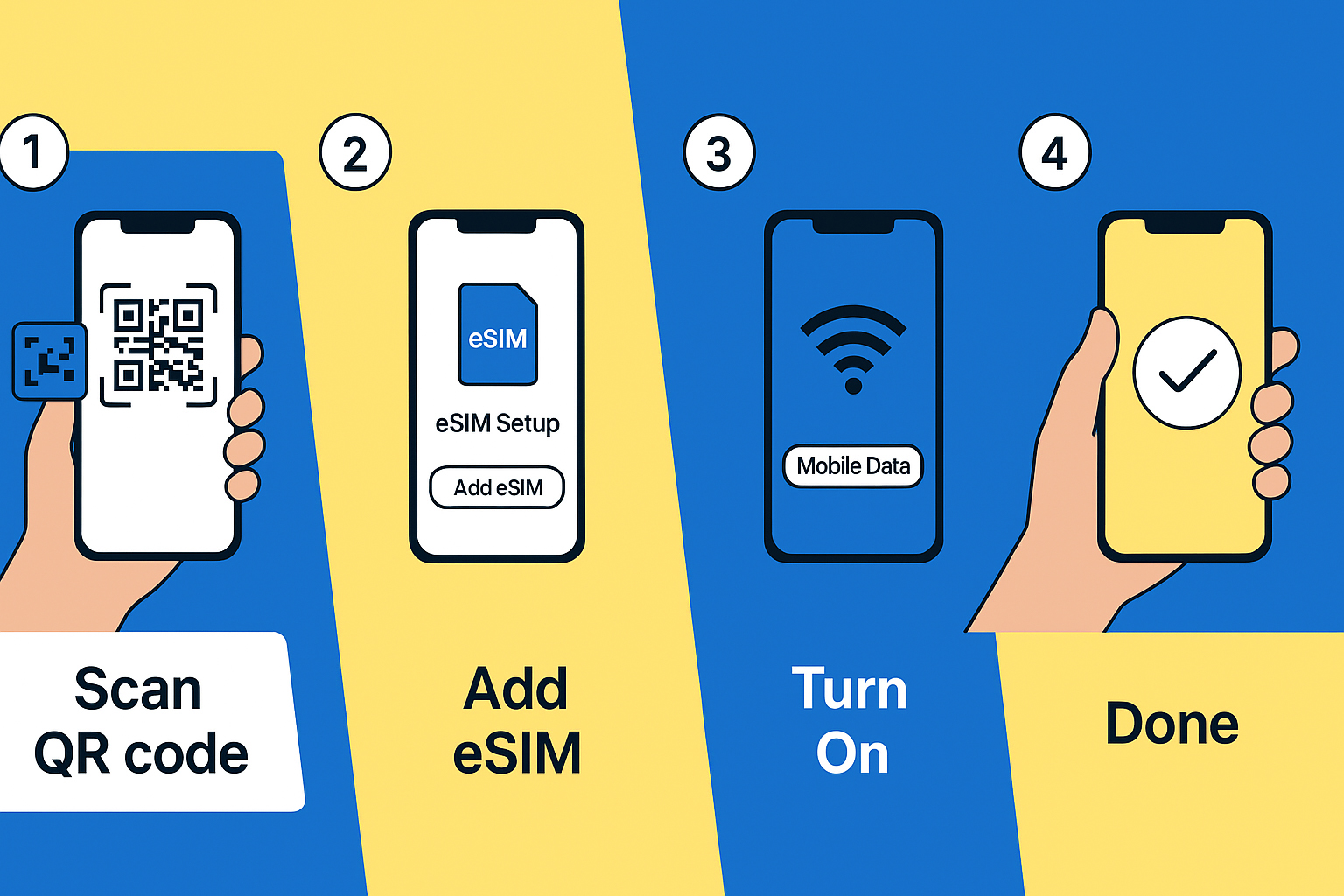
Step by step image of installing and activating travel eSIM

Setting up an eSIM is easier than setting up a new app.

Here’s the fastest method used by most travelers:

Step 1: Buy Your Travel eSIM Plan

Purchase from a trusted provider like OneSimCard.
You’ll receive:

  • A QR activation code

  • Manual activation details

  • Setup instructions

Step 2: Connect to Wi-Fi

This is important — eSIM installation requires internet access.

Step 3: Open Your Phone’s eSIM Menu

iPhone:
Settings → Cellular → Add eSIM (or Add Cellular Plan)

See a step-by-step video guide here: iPhone Installation Guide


Android:
Settings → Connections → SIM Manager → Add eSIM

See a step-by-step video guide here: Android Installation Guide

Step 4: Scan the QR Code

Hold your phone over the QR code.
Your device will begin downloading the eSIM profile.

Step 5: Turn on Your New Plan

Enable:

  • Turn On This Line

  • Data Roaming (required for travel eSIMs)

  • Set as Primary Data Line (optional)

Step 6: Test Your Connection

Once activated, you should see:

  • Signal bars

  • “LTE” or “5G”

  • Network name (depending on country)

You’re ready to go!


Advanced Users: Switching Between eSIM Profiles

One of the most underrated eSIM features is the ability to store multiple profiles (although with OneSimCard, you can just use our eSIM over and over for years because the eSIM doesn’t expire).

You can:

  • Turn eSIM profiles on/off

  • Name each plan (e.g., “Europe Trip”)

  • Switch between plans instantly

  • Leave inactive profiles installed for future trips

This makes eSIMs perfect for:

  • Frequent flyers

  • Digital nomads

  • Cross-border workers

  • Cruise travelers

  • Snowbirds

It’s like having several SIM cards in your pocket — without the clutter.


⚖️ eSIM vs. Physical SIM: Why eSIMs Win Every Time

Here’s a quick comparison:

Feature eSIM Physical SIM
Instant activation ✅ Yes ❌ Requires pickup/store
Can’t be lost ✅ Yes ❌ Easy to lose
Secure against SIM swaps ✅ Yes ❌ Vulnerable
Multiple plans ✅ Yes ❌ Only one at a time
No tiny card to handle ✅ Yes ❌ Requires tools
Remote provisioning ✅ Yes ❌ Must insert manually

When you compare point-by-point, it’s easy to see why the travel industry is moving quickly toward eSIM-only devices.


Why OneSimCard Is the Best Travel eSIM for Beginners

OneSimCard takes the guesswork out of travel connectivity:

  • Instant QR activation

  • Coverage in 200+ countries

  • Multi-network redundancy for stronger signal

  • No contracts or subscriptions

  • Affordable plans — from light usage to heavy data

  • Optional voice calling and SMS via OneSim VoIP

Whether you need a simple plan for a weekend trip or a reliable multi-country solution for a 6-month adventure, OneSimCard delivers.


Ready to Try a Travel eSIM?

Travel eSIMs are the future — and they’re already making international adventures cheaper, easier, and more secure.

You no longer need to juggle plastic SIM cards or fear roaming charges.
With a travel eSIM, your phone “just works” wherever you go.

Activate your OneSimCard Travel eSIM now and experience borderless connectivity.

How to Choose the Right eSIM Plan: Pay-As-You-Go vs. Data Packages

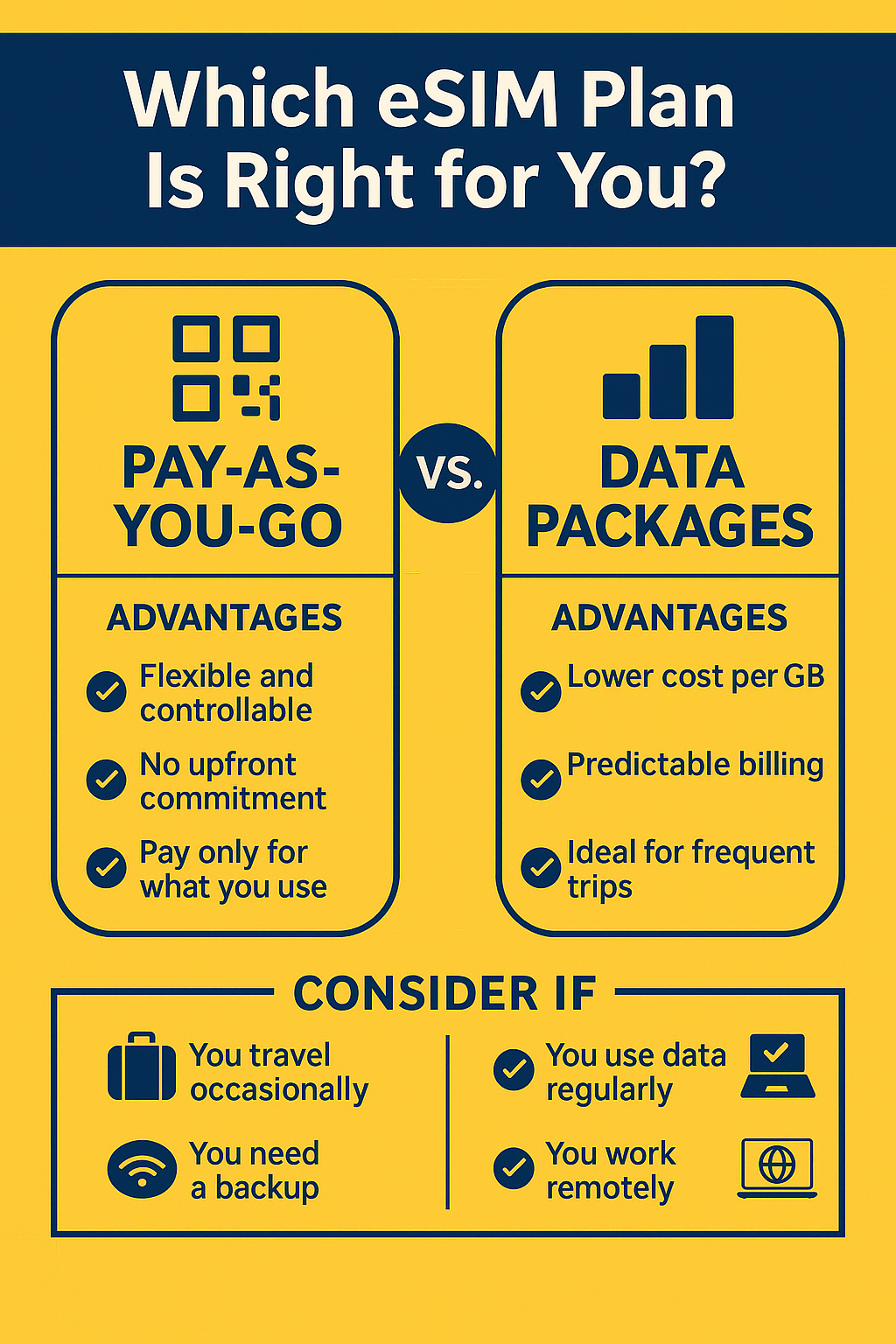
Pay-As-You-Go vs Data Package infographic for eSIM

Choosing the right travel eSIM plan can make or break your international trip. Whether you’re a weekend wanderer, a digital nomad, or a frequent flyer, your connectivity needs will differ — and so will your costs.

The two main models travelers encounter are pay-as-you-go eSIMs and prepaid data packages. Each has advantages depending on how often and how much you use data while abroad. Let’s break them down so you can make an informed decision and save money on your next journey.


Understanding eSIM Plan Pricing Models

Before you can compare eSIM data plans, it’s important to understand the three main pricing structures used by global eSIM providers.

Pay-As-You-Go Explained

With a pay-as-you-go (PAYG) eSIM, you only pay for the data you actually use. There’s no upfront commitment or monthly fee — perfect if your data needs vary from one trip to another. You can top up at any time, and your balance simply decreases as you consume data.

Advantages:

  • Great for short trips or uncertain usage

  • No wasted data or expiration pressure

  • Ideal backup for emergencies or secondary devices

Considerations:

  • Typically higher per-GB cost than bulk data plans

  • Requires active monitoring of your balance, or OneSimCard’s convenient auto-recharge option.

Prepaid Data Packages

These data packages are sold in specific sizes — for example, 1GB, 5GB, or 10GB bundles that expire after a set time (usually 7, 14, or 30 days). You pay upfront, and the eSIM provides consistent data speeds and coverage.

Advantages:

  • Much Lower cost per GB

  • Predictable spending

  • Simple to manage for longer stays

Considerations:

  • Unused data expires

  • You may need to top up before the plan ends

Subscription-Based Models

Some providers now offer monthly eSIM subscriptions, charging a flat fee for ongoing data access in one or more regions. These appeal to frequent travelers, but they often come with fixed limits or auto-renewal requirements.


✈️ When Pay-As-You-Go eSIM Plan Makes Sense

For certain travelers, PAYG eSIMs are the smartest and most flexible option.

Occasional Travelers

If you take just a few international trips a year, it doesn’t make sense to commit to recurring plans. PAYG lets you stay connected during short vacations or weekend getaways without pre-paying for unused data.

Light Data Users

Some travelers rely mostly on hotel Wi-Fi and only need mobile data for maps or ride-hailing apps. PAYG plans are perfect here — you pay a little, use a little, and avoid waste.

Backup Connectivity

Even if you primarily rely on local SIM cards or Wi-Fi, having a PAYG eSIM installed ensures you’re never stranded without data when crossing borders or losing signal from your primary SIM.

In short, PAYG equals control — perfect for those who value flexibility over volume.


When a Data Package eSIM Plan Is Better

If you’re abroad frequently or use your phone as a mobile office, data packages are the more cost-effective solution.

Long-Term Travelers and Expats

For anyone staying abroad for weeks or months, prepaid eSIM packages offer stable pricing and dependable connectivity. You can easily renew the same plan or switch to another country’s bundle through your eSIM portal.

Business Travelers

Professionals need reliability and predictability. Data packages eliminate surprise top-ups, offering a steady stream of data for email, video calls, and navigation without running out mid-meeting.

Digital Nomads and Remote Workers

If you’re working from Lisbon one week and Bali the next, having a regional eSIM plan ensures coverage across multiple countries at a flat rate. This helps simplify billing and guarantees network consistency for streaming, uploading, and video conferencing.


How to Compare Costs Between eSIM Providers

With so many global eSIM brands competing for travelers’ attention, it’s worth learning how to do an eSIM pricing comparison properly.

Example Pricing Overview (1GB in Europe)

Provider 1GB Validity Approx. Cost
OneSimCard eSIM $4.50 14 days Multi-network access
Airalo $7.50 7 days Single-network coverage
Holafly $19 Unlimited High upfront cost
Nomad $8 30 days Regional
Ubigi $9 30 days Auto top-up required

(Pricing as of 2025 – subject to change)

Effective Cost per GB

To evaluate the true value, divide your plan cost by its duration and total data. For example, a 5GB / 30-day plan for $25 costs $5 per GB, which may outperform a cheaper plan that expires after 7 days.

Look beyond the sticker price. Factors like coverage, speed, and network redundancy matter just as much as cost.


Why OneSimCard Offers the Best Balance

Choosing between pay-as-you-go and data packages doesn’t have to be all or nothing — with OneSimCard, you can mix and match both.

  • Transparent pricing: No hidden fees, surcharges, or forced subscriptions.

  • OneSimVoIP app: Add optional voice and SMS to any eSIM data plan.

  • Customizable bundles: Buy what you need — whether it’s 500MB for a weekend or 20GB for a month-long project.

  • Global reliability: Multi-network access in 200+ countries ensures your connection never drops mid-journey.

With OneSimCard, you’re not tied to a single plan type — your eSIM adapts to your travel lifestyle.


Find the Right Plan for Your Trip

Whether you’re a casual vacationer or a full-time remote worker, understanding travel eSIM plans helps you stay connected without overspending.

Pay-as-you-go gives flexibility and control; data packages offer predictable value and stability. With OneSimCard, you get the best of both worlds — coverage, clarity, and cost efficiency.

Find the Right Plan for Your Trip — Activate Your OneSimCard eSIM Now!

Troubleshooting eSIM Issues While Abroad

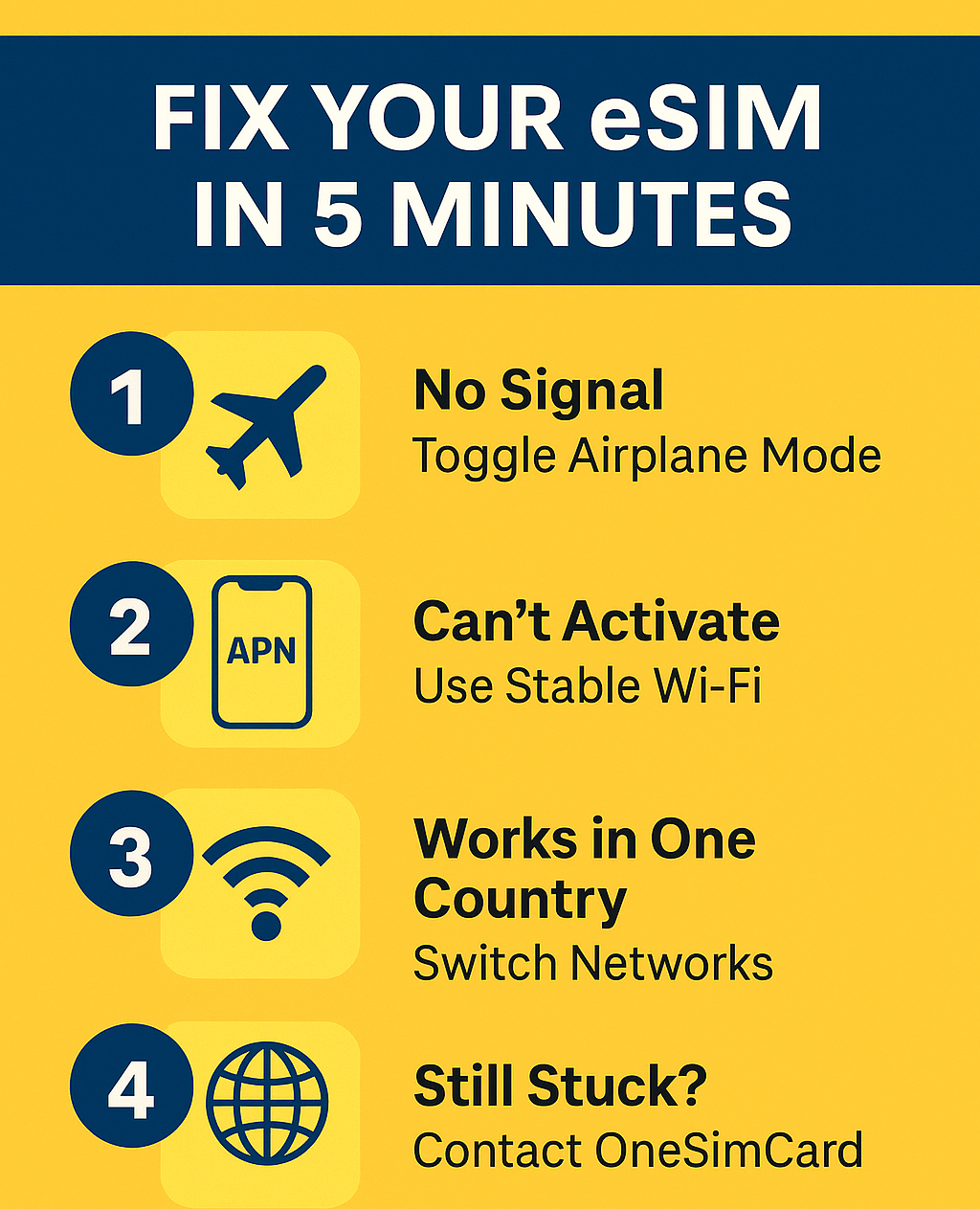
Troubleshooting eSIMsReal-World Help for Travelers: Signal Loss, APN Setup & More. Troubleshooting eSIMs is simple!
When looking for international SIM cards, eSIMs have transformed international travel. Instead of juggling physical SIM cards or paying outrageous roaming fees, travelers can now activate data plans instantly with a quick QR scan. But even though eSIMs make staying connected easier, problems can still arise — especially when hopping between countries or networks.

Are you asking?:

  • “eSIM not working abroad”
  • “eSIM no service fix”
  • “eSIM troubleshooting guide”
  • “eSIM has signal but no data”

Whether you’re in Paris, Phuket, or Patagonia, here’s a practical guide to troubleshooting eSIM issues while abroad.


1. No Signal or “No Service” After Activation

This is the most common issue travelers face after installing an eSIM. You’ve scanned the QR code, it shows as “active,” but your phone still says “No Service.”

✅ Step-by-Step Fix:

  1. Turn Airplane Mode On and Off
    Wait 30 seconds and disable it — this forces your phone to rescan for available networks.

  2. Manually Select a Network

    • Go to Settings → Cellular → Network Selection (iPhone) or Settings → Connections → Mobile Networks → Network Operators (Android).

    • Toggle Automatic off, then pick one of the listed networks manually.

    • If you’re using a OneSimCard eSIM, try selecting one of our preferred roaming partners in your country.

  3. Restart Your Device
    Simple but effective — restarting clears temporary network glitches.

  4. Check if Data Roaming is On

    • For eSIMs, roaming must be enabled to access local partner networks abroad.

    • Navigate to Settings → Cellular → eSIM Plan → Data Roaming → On.

Pro Tip: In some regions, 2G or 3G networks are no longer supported. If your phone is older or set to connect automatically, switch to 4G/LTE only for better results.


⚙️ 2. Can’t Access Mobile Data (Even with Signal)

You have bars of signal but no internet — pages won’t load, maps can’t refresh, and apps spin endlessly. This typically means your APN (Access Point Name) isn’t set up correctly.

✅ Step-by-Step Fix:

  1. Check APN Settings

    • iPhone:
      Settings → Cellular → Your eSIM Plan → Cellular Data Network

    • Android:
      Settings → Mobile Network → Access Point Names

  2. Enter the Correct APN Information

    • For OneSimCard eSIM, the APN is typically: OSC
      (unless otherwise noted in your installation email).

    • Leave Username, Password, and Proxy fields blank.

  3. Restart Data Connection

    • Turn off Mobile Data for 10 seconds, then turn it back on.

    • Reopen your browser or try a speed test to confirm connectivity.

⚠️ Common Mistake: Many travelers forget to switch the “default data line” to their eSIM.
Go to Settings → Cellular Data → Select Your eSIM to ensure data routes through the correct plan.


3. eSIM Not Downloading or Activating

If your eSIM profile fails to download or install, it could be due to poor Wi-Fi, expired QR codes, or device compatibility.

✅ Step-by-Step Fix:

  1. Ensure You Have a Stable Wi-Fi Connection
    Activation requires internet access. If hotel Wi-Fi is unreliable, use a hotspot or café connection.

  2. Scan the QR Code Again

    • Go to Settings → Cellular → Add eSIM (or Mobile Plan).

    • Re-scan your OneSimCard QR code from your email or app.

    • If it’s expired, request a fresh activation link from support. This may require getting a new eSIM.

  3. Check Device Compatibility
    Only devices with built-in eSIM support will work. See our Complete eSIM Compatibility Guide for iPhone and Android for reference.

  4. Update Your Operating System
    Outdated software can block installation. Update to the latest version of iOS or Android before retrying.


4. eSIM Plan Doesn’t Appear in Settings

Sometimes, travelers install their eSIM successfully, but it doesn’t show under “Cellular Plans” or disappears after an update.

✅ Step-by-Step Fix:

  1. Restart Your Device — this often restores the display.

  2. Check Your Primary SIM Settings
    If you’re using a physical SIM simultaneously, ensure it isn’t set to “data only” while your eSIM is disabled.

  3. Reinstall the eSIM Profile

    • Delete the current profile under Settings → Cellular Plans → Remove eSIM

    • Re-scan the QR code to reinstall it fresh.

Pro Tip: Always save a backup of your eSIM QR code before traveling — many users delete their activation email by mistake!


5. Data Works in One Country but Not Another

Multi-country eSIMs (like OneSimCard’s) are designed for roaming, but occasionally, coverage may vary due to regional network preferences or restrictions.

✅ Step-by-Step Fix:

  1. Manually Switch Carriers

    • Turn off Automatic Network Selection.

    • Try another partner network in your current country (list provided in your OneSimCard app or welcome email).

  2. Enable Data Roaming
    Even if it worked before, moving across borders sometimes resets roaming permissions.

  3. Restart Device After Crossing Borders
    This refreshes your connection with the new country’s local network.

Tip for Frequent Travelers: Enable the OneSimCard eSIM Portal to monitor live connections, toggle networks remotely, and check data balances in real-time. Also, BE PATIENT!! Sometimes when you cross boarders it takes up to 15 minutes to find the right carrier(s)!


6. Battery Draining Faster Than Usual

Using dual SIMs (physical + eSIM) can slightly increase power usage because your phone pings two networks simultaneously.

✅ Step-by-Step Fix:

  • Turn off the SIM you’re not using.

  • Disable Background App Refresh for high-data apps like Maps or Instagram.

  • Use Low Power Mode while on the go.

⚙️ eSIMs themselves don’t drain extra battery — it’s the additional background network activity that does.


7. Calls or Texts Aren’t Working

If you can access data but can’t make calls or send SMS, the issue usually lies in your phone’s “Default Voice Line” settings or VoIP configuration.

✅ Step-by-Step Fix:

  1. Set Your eSIM as the Default Line for Calls
    Settings → Cellular → Default Voice Line → Choose eSIM

  2. Check Preferred Network Type
    Switch to “4G/VoLTE Preferred.” Some regions no longer support 3G voice networks.

  3. Use OneSimVoIP App for Calls
    If your plan is data-only, you can still make and receive calls with the OneSimVoIP app — available on iOS and Android.


8. When to Contact Support

If you’ve tried all the above steps and your eSIM still isn’t working:

  • Check your plan’s data balance or expiration date in your OneSimCard account.

  • Make sure your device IMEI isn’t carrier-locked.

  • Contact OneSimCard Support with the following info:

    • Device model and OS version

    • Country you’re in

    • Signal status and network name

Our team can run a live diagnostic and often resolve issues within minutes.

Still Having eSIM Trouble?

OneSimCard’s travel eSIM is designed for real international use, with wide coverage in over 200 countries, multiple networks, and instant setup.


Shop DataMax eSIM


Learn More About eSIM

The Complete International eSIM Compatibility Guide for iPhone and Android

What Is an eSIM — and Why It Matters

An eSIM (embedded SIM) is a digital version of the traditional plastic SIM card. Instead of inserting a physical chip, you simply download a mobile profile directly to your smartphone.

For travelers, this means you can:

  • Activate international data instantly without visiting a store

  • Switch between local and global plans in seconds

  • Keep multiple numbers or data profiles on one device

  • Avoid roaming fees and lost SIM cards

As eSIM adoption grows, most new phones from Apple, Samsung, Google, and other brands now include this feature. Let’s explore which models support it — and how to check if yours does.

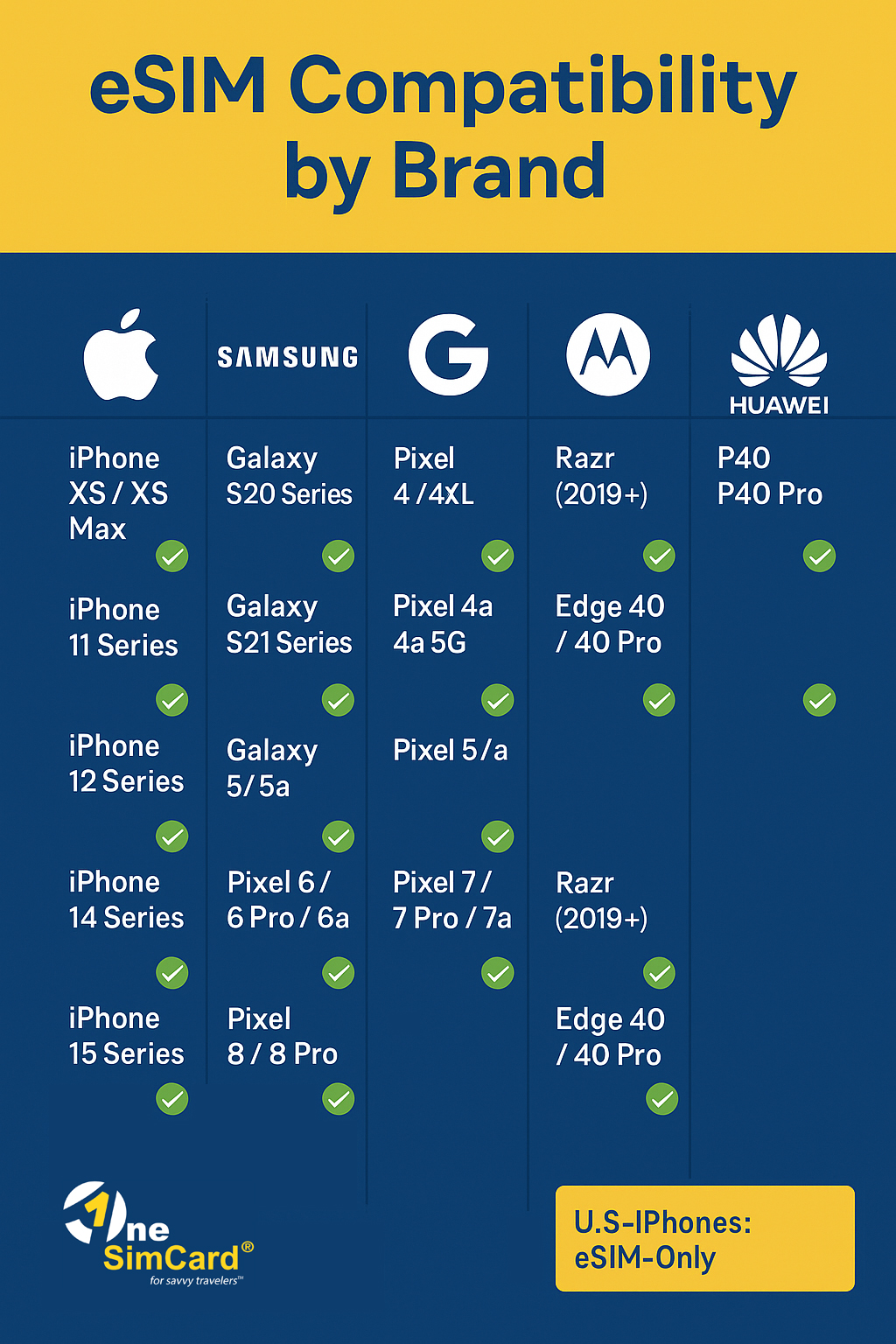
Infographic Chart Showing eSIM compatibility for iPhone, Samsung, Google, Motorola and Huawei devices
Compatible Phones – Quick Reference

Apple iPhone eSIM Compatibility

Apple was the first major brand to push eSIM adoption, starting in 2018.

iPhone Model eSIM Supported Dual eSIM Capability
iPhone XS / XS Max ✅ Yes ❌ One eSIM + one physical SIM
iPhone XR ✅ Yes ❌
iPhone 11 / 11 Pro / 11 Pro Max ✅ Yes ❌
iPhone 12 / 12 mini / 12 Pro / 12 Pro Max ✅ Yes ✅ Dual eSIM supported (iOS 15+)
iPhone 13 / 13 mini / 13 Pro / 13 Pro Max ✅ Yes ✅
iPhone 14 Series ✅ Yes ✅ (U.S. models are eSIM-only)
iPhone 15 / 15 Plus / 15 Pro / 15 Pro Max ✅ Yes ✅ (U.S. models are eSIM-only)

Pro Tip: If you bought your iPhone in the U.S. (starting with the iPhone 14), it likely has no physical SIM slot — meaning you’re already using eSIM by default.

How to check your iPhone for eSIM support:

  1. Go to Settings → Cellular (or Mobile Data)

  2. Tap Add eSIM or Add Cellular Plan

  3. If you see the option to scan a QR code, your phone supports eSIM.


Android eSIM Compatibility

Unlike Apple, Android phones vary more widely across manufacturers and regions. But most premium and newer mid-range devices support eSIM.

Samsung eSIM Support

Model eSIM Supported Notes
Galaxy S20 / S20+ / S20 Ultra ✅ Yes Region-specific (not all carriers enable it)
Galaxy S21 / S21+ / S21 Ultra ✅ Yes Dual SIM with eSIM support
Galaxy S22 / S22+ / S22 Ultra ✅ Yes Global support
Galaxy S23 / S23+ / S23 Ultra ✅ Yes Full eSIM functionality
Galaxy Z Flip / Flip3 / Flip4 / Flip5 ✅ Yes Compact dual-SIM flexibility
Galaxy Z Fold / Fold2 / Fold3 / Fold4 / Fold5 ✅ Yes Ideal for frequent travelers

Note: Some carrier-locked versions may disable eSIM — always confirm with your provider or use OneSimCard eSIM for universal activation.


Google Pixel eSIM Support

Model eSIM Supported
Pixel 3 / 3 XL (some models) ✅ Partial
Pixel 4 / 4 XL ✅ Yes
Pixel 4a / 4a 5G ✅ Yes
Pixel 5 / 5a ✅ Yes
Pixel 6 / 6 Pro / 6a ✅ Yes
Pixel 7 / 7a / 7 Pro ✅ Yes
Pixel 8 / 8 Pro ✅ Yes

Pixels are among the most eSIM-friendly phones — they work across dozens of global networks, making them ideal for international travelers using OneSimCard eSIM.


Other Android Brands

Brand Compatible Models eSIM Notes
Motorola Razr 2019+, Edge 40, Edge 40 Pro ✅ Yes, on select models
Huawei P40, P40 Pro, Mate 40 Pro ✅ Yes, but limited Google support
OPPO Find X3 Pro, Find X5, Reno 8 Pro ✅ eSIM support growing rapidly
Xiaomi 13 Series, 13T Pro ✅ Supported in select regions
Honor Magic5 Pro ✅ Supported
Sony Xperia 10 III+, Xperia 5 IV, Xperia 1 V ✅ Yes

Regional Variations to Know

Not all models sold in every market have eSIM enabled.
For example:

  • Some Samsung phones in South America or Asia ship without eSIM activation.

  • iPhones purchased in China or Hong Kong may have dual physical SIM slots instead.

  • Pixel devices are generally universal, but activation depends on the local carrier.

✅ Always confirm your model’s eSIM capability by visiting your phone’s manufacturer support page or checking in the SIM settings menu.

Call to action to buy eSIM


Why Travelers Love eSIM

For anyone using an international eSIM like OneSimCard, compatibility means freedom:

  • Instant activation: Scan a QR code before your flight.

  • No waiting for delivery: Perfect for last-minute trips.

  • Switch plans anytime: Use one eSIM for Europe, another for Asia.

  • Stay connected: Keep your home number active while using local data.

With more than 200 countries covered, OneSimCard eSIMs work on major devices listed above — ensuring your phone stays connected whether you’re hiking in the Alps or working remotely from Bali.


Final Thoughts

eSIM technology is transforming how we travel, communicate, and stay connected. With nearly all major phones now supporting it, you can leave behind the hassle of swapping plastic SIMs — and enjoy instant, global data at your fingertips.

Whether you’re using the latest iPhone 15, Samsung Galaxy S23 Ultra, or Google Pixel 8, a OneSimCard eSIM ensures seamless connectivity across borders, at local rates, with no contracts or roaming surprises.

So before your next trip, check your phone’s eSIM settings, grab a OneSimCard eSIM with our App on Apple App Store or Google Play Store, and enjoy the freedom of truly borderless communication.

Android eSIM Lets You Switch Networks Like a Local Anywhere


Cartoon person holding an Adroid eSIM phone
eSIM for Android

Imagine landing in a new country, stepping off the plane, and instantly having mobile service that feels like home, no frantic searches for a local SIM card, no confusing activation processes. Sounds too good to be true, doesn’t it? Thanks to the innovation of the Android eSIM, this seamless experience is becoming the new normal.

In a world where staying connected is essential , whether for work, travel, or just peace of mind , Android eSIM technology is transforming the way people access mobile networks globally. No longer shackled by physical SIM cards or expensive roaming fees, users can now switch networks as easily as changing apps on their phone. Intrigued? Read on to discover how Android eSIM lets you switch networks like a local anywhere, with convenience and cost-efficiency at its core.

What Is an Android eSIM and Why Does It Matter?

First, what exactly is an Android eSIM?

An eSIM, or embedded SIM, is a tiny chip embedded inside your phone. Unlike traditional SIM cards, which are physical and must be inserted or swapped out, an Android eSIM is programmable remotely. This means no more fumbling with tiny plastic cards or hunting for stores abroad to buy local SIMs.

Here’s why this matters profoundly:

Feature Traditional SIM Card Android eSIM
Physical Card Yes, must insert or replace No, embedded in the device
Network Switching Manual swap required Remote provisioning instantly
Convenience Limited to card availability Instant activation globally
Roaming Costs Often high Reduced by local profiles
Device Compatibility Most phones Supported by many Android phones

For globe-trotters or business travellers, this offers unparalleled freedom and savings. Instead of paying hefty roaming charges or risking being offline, one can download a local network profile from anywhere at any time.

Switching Networks Like a Local: How Does It Work?

So how does this work? The eSIM holds many operator profiles as data. You pick one in your phone’s settings or app, tap to start, and boom, you’re on a local network. No lines, no card swaps.

Say you get to Paris. Instead of looking for a local SIM, you open your phone, pick a French network, and get online right then. It’s like carrying many phones, but all in one.

This is great if you:

  • Travel cross borders often
  • Need fast, sure phone use without wait
  • Want to skip high roaming fees

Android eSIM lets you keep your home number while adding a local line or switch to just a local plan. That choice is worth its weight in gold.

Android eSIM vs. Traditional SIM: A Comparative Overview

Here’s a quick look to help you see the shift:

Aspect Traditional SIM Android eSIM
Physical Handling Must insert or pull out No need to touch
Activation Speed Buy and insert needed Download and start fast
Multiple Numbers One SIM per slot only Store many profiles
Device Compatibility Most phones Newer Android phones
Roaming Flexibility Limited and costly High, easy local switch

This shows how much easier and smart Android eSIM makes your phone use.

How to Activate Android eSIM: Step-by-Step

Setting up eSIM isn’t rocket science. Here’s how to do it:

  • Check Device Compatibility

Make sure your Android phone supports eSIM. Most recent Google Pixels, Samsung Galaxy S series, and other flagship models do.

  • Choose a Provider

Look for a carrier or provider offering eSIM plans for your travel destination or needs.

  • Purchase the eSIM Plan

Buy online. Usually, you’ll get a QR code or activation details sent by email.

  • Scan the QR Code

Go to your phone’s settings under Mobile Network > Add Carrier, and scan the QR code to download the profile.

  • Activate and Switch

Activate immediately or switch between saved profiles as you need.

This takes just minutes, compared to the old SIM card hunt that could eat hours.

Common Questions About Android eSIM

●     Will I be locked to one carrier?

No. eSIM profiles are carrier-neutral. You can switch providers freely.

●     What if I lose my phone?

Since there’s no physical SIM, it can’t be stolen or swapped. You can remotely deactivate your profiles.

●     Can I still use a traditional SIM?

Most phones support both eSIM and physical SIM, so you’re covered either way.

Common Concerns About Android eSIM Addressed

Many hesitate to adopt new tech without knowing the pitfalls. Let’s address some common questions about Android eSIM.

●     Will Android eSIM lock users into a specific carrier?

No. eSIM profiles are carrier-neutral, meaning users can switch providers without restrictions.

●     What if the phone is lost or stolen?

Because the SIM is embedded, it cannot be physically removed, enhancing security. Profiles can be remotely deactivated.

●     Is it difficult to revert to physical SIMs?

Not at all. Most phones support both eSIM and physical SIM cards, allowing users to choose based on preference.

Future Trends: What’s Next for Android eSIM?

As the industry advances, Android eSIM adoption is expected to surge, supported by:

  • More carriers worldwide offering eSIM plans
  • Improved device compatibility across price ranges
  • Integration with IoT and wearable devices
  • Users can look forward to even more seamless, global connectivity in the near future.

Android eSIM Benefits at a Glance

Benefit Description Impact on Users
Cost Efficiency Access local rates, avoid roaming fees Save money on mobile bills
Instant Activation Download and activate profiles remotely Convenience and time-saving
Multi-Network Support Store multiple network profiles Flexibility to switch easily
Enhanced Security Embedded chip reduces theft risk Peace of mind
Broad Device Compatibility Supported on latest Android devices Widely accessible

Why Choose Android eSIM Now?

With travel rebounding and global communication more critical than ever, switching to an Android eSIM isn’t just smart, it’s necessary. The convenience, cost savings, and security advantages make it a no-brainer for anyone wanting to stay connected without the usual headaches of international mobile service.

Why settle for costly roaming or bulky SIM cards when Android eSIM offers a slick, local-like experience anywhere in the world?

Take Action: Try Android eSIM Today!

Curious if your phone supports Android eSIM? Ready to ditch roaming fees forever? The time to explore eSIM technology is now. Check your device’s settings, browse providers offering global eSIM plans, and step into the future of mobile connectivity. The world is literally at your fingertips.

Why an eSIM Is the Best Way to Stay Connected When Travelling Internationally

Hand Holding Smartphone With eSIM Chip Sign on Its Screen, Flat Design Style Illustration
eSIMs are the best option to stay connected when traveling internationally

Traveling internationally is more accessible and common than ever, whether for leisure, business, or remote work. But one of the biggest challenges that persists for globetrotters is staying connected. From expensive roaming charges to the hassle of swapping physical SIM cards, traditional mobile connectivity methods can be cumbersome. Fortunately, eSIM (embedded SIM) technology is changing the game. In this blog, we explore why eSIMs are the best option for international travelers who want a seamless, cost-effective, and hassle-free way to stay connected.

What is an eSIM?

An eSIM, or embedded SIM, is a digital version of the traditional SIM card. Instead of inserting a physical card into your phone, tablet, or smartwatch, an eSIM is built into the device’s hardware. It allows you to download and activate a cellular plan directly onto your device via QR code or an app, without needing to handle any physical component.

Convenience and Ease of Use

One of the biggest advantages of using an eSIM when traveling internationally is convenience. Before you even step on the plane, you can purchase and install a local or regional data plan right from your device. There’s no need to search for a SIM vendor at the airport or navigate a new country without data access.

Additionally, many providers offer apps that allow you to compare plans, activate service, and manage usage—all within minutes. If you’re visiting multiple countries, you can easily switch between different eSIM profiles depending on your location and needs. Download the OneSimCard eSIM app for Apple or Android:

Google Play eSIM button

Cost Savings

Roaming charges can quickly add up, especially if you’re using your home carrier’s international data plan. eSIMs help eliminate these costs by allowing you to select local carriers or specialized travel data providers with far more competitive pricing.

For example, instead of paying $10 to $15 per day in roaming fees, you could activate a local eSIM plan offering several gigabytes of data for a fraction of the cost. With so many providers competing in the eSIM market, you’re likely to find a plan that fits both your budget and usage requirements.

Instant Activation

eSIMs offer immediate connectivity. Most providers allow you to activate your plan instantly by scanning a QR code or downloading a profile from their app. There’s no waiting period, no paperwork, and no need to visit a store.

This instant activation is especially useful for frequent travelers or business professionals who can’t afford downtime. You can be online within minutes of landing, ready to check maps, book transportation, or communicate with colleagues and loved ones.

Multiple Profiles and Easy Switching

Unlike physical SIMs, which require you to physically remove and replace cards, eSIMs let you store multiple profiles on your device. You can easily switch between different carriers and plans through your phone’s settings.

This is particularly helpful for travelers who are visiting multiple countries on one trip. Instead of juggling several SIM cards, you can switch between different eSIM plans with just a few taps.

Better Security and Durability

Because there is no physical card involved, eSIMs are less prone to damage or loss. Travelers often swap SIMs in airports or cafes, increasing the risk of losing their home SIM or damaging the card slot. eSIMs eliminate this concern entirely.

Additionally, eSIM profiles are encrypted and can be protected with passwords or biometric authentication, adding a layer of security to your mobile connectivity.

Wide Device Compatibility

Most modern smartphones, including recent models from Apple, Samsung, and Google, support eSIM technology. Wearables like smartwatches and some tablets also support eSIMs, making it easier than ever to stay connected across all your devices.

If your device supports dual SIM functionality (physical + eSIM), you can keep your home SIM active for calls and texts while using a local eSIM for data. This ensures that you don’t miss important messages or calls while benefiting from affordable data services.

Environmentally Friendly

eSIMs are also a greener alternative to traditional SIM cards. By going digital, we reduce the production, shipping, and disposal of plastic SIM cards and packaging. With millions of travelers worldwide, this small shift can make a big environmental impact over time.

Flexibility for Remote Workers and Digital Nomads

Remote work has become more prevalent, and many professionals are choosing to live a location-independent lifestyle. For digital nomads, staying connected is not a luxury—it’s a necessity.

eSIMs provide the flexibility needed for this lifestyle. With the ability to switch networks and manage plans from anywhere, remote workers can ensure stable internet connections for video calls, file transfers, and collaboration tools, no matter where they are in the world.

Access to Local Networks

When you use an eSIM with an international data provider like OneSimCard, you get access to that carrier’s full network coverage and speeds. This is often better than roaming through your home provider, which might partner with local carriers but offer throttled speeds or limited bandwidth.

Using a local network through an eSIM generally results in faster data speeds, more reliable coverage, and lower latency—all of which are important when navigating new environments or relying on cloud-based apps.

Tips for Using eSIMs While Traveling

  • Check Device Compatibility: Ensure your phone or device supports eSIM functionality.
  • Compare Providers: Use comparison websites or apps to find the best plan for your destination.
  • Download in Advance: Activate your eSIM profile before leaving or while you still have access to Wi-Fi.
  • Monitor Data Usage: Keep track of your data usage to avoid unexpected overages.
  • Use Dual SIM if Available: If your device allows, keep your home SIM active for calls and use your eSIM for data.

Conclusion

Staying connected while traveling internationally no longer has to be expensive or inconvenient. eSIM technology offers a smarter, more flexible, and cost-effective solution for travelers. With instant activation, multiple plan options, and seamless switching between carriers, eSIMs have truly revolutionized how we connect abroad. Whether you’re a casual vacationer, a business traveler, or a full-time digital nomad, making the switch to eSIM can simplify your travel experience and keep you connected every step of the way. OneSimCard’s DataMax eSIM is a great choice if you are looking for low data rates in over 200+ global destinations!

Worldwide eSIM: The Ultimate Travel Hack for Seamless Connectivity Anywhere

eSIM loaded onto a Smartphone
Phone with Worldwide eSIM technology.

Have you ever landed in a new country, only with the frustrating hunt for a local SIM card or the dread of exorbitant roaming charges? In today’s hyper-connected world, staying online is no longer a luxury; it’s a necessity. Whether you’re navigating unfamiliar streets, sharing travel moments, or staying on top of work, seamless connectivity is the key to a stress-free journey.

But let’s face it: traditional SIM cards are a relic of the past. Are you sick and tired of fumbling with tiny plastic cards, worrying about losing them, and the hassle of switching them out every time you cross a border? It’s a traveler’s nightmare. Enter the worldwide eSIM, the game-changer that’s revolutionizing how we stay connected on the go.

What is a Worldwide eSIM?

An eSIM, or embedded SIM, is a digital SIM card built directly into your device. Instead of a physical card, you download a software profile that activates your mobile plan. Think of it as a digital passport for your phone, allowing you to switch between carriers and plans without physically swapping anything.

Unlike traditional SIMs, which are tied to a specific carrier and require physical insertion, eSIMs are flexible and programmable. They can store multiple profiles, letting you easily switch between different plans for different countries. Most modern smartphones, tablets, and even smartwatches are now eSIM-compatible, making it easier than ever to embrace this technology.

How Does a Global eSIM Work?

Enabling a worldwide eSIM is relatively easy. Here’s the break down:

  • Select an eSIM Provider: Choose a recognized provider with plans available for your location.
  • Buy a Plan: Select a data plan based on your needs and budget.
  • Activate Your eSIM: You’ll usually get a QR code or activation code. Scan or enter it on your device to download and install the eSIM profile. OneSimCard offers helpful step-by-step video guides for eSIM installation on iOS and Android
  • Control Your Plans: Most devices enable you to control several eSIM profiles, so you can easily switch between plans for each destination.
  • Roaming or Local Network Choice: Most eSIMs provide the option of roaming on partner networks or joining local networks, so you get the best of both options.

Will Your Phone Work With eSIM?

To use an eSIM, check if your phone is compatible. Most new phones from popular manufacturers like Apple, Samsung, and Google work with eSIMs, but older ones may not. Some tablets, smartwatches, and laptops use them too. You can check your phone’s menu or the devices specifications to see if it will work.

Some think eSIMs are not safe, but that is not true. eSIMs have more security to keep your info safe and can be wiped remotely if lost. Some worry that switching is difficult, but all it takes is a few taps. More folks should give eSIMs a try.

What Comes Next for eSIMs?

More folks will use worldwide eSIMs as time goes on. They already work with 5G, which means fast speeds in more spots. Some cars and smart devices will use them, too. Soon, most of the world may drop SIM chips and use eSIMs for all data, calls and texts.

As tech grows, eSIMs will provide even more advantages. Phones, tablets, and watches will work better with them, and new devices like smart rings and AR gear may be used too. Cars with eSIMs will link to maps, road help, and music streaming apps without a phone.

Big firms may switch to eSIMs to keep work devcies linked with ease. No need for new SIM chips when staff move or switch plans—just tap a screen and swap to a new one.

With more use comes more growth. As firms build new ways to use eSIMs, they will shape how we link to the web, each other, and the world.

Conclusion

eSIMs make life easy, cut waste, and help us stay connected with no fuss. They save money, time, and space while being safe and smart. More folks now see the perks, and soon, SIM chips may be a thing of the past. If you want a simple way to stay online, an eSIM is the way to go.

With no need for a small chip, no lines at the shop, and no high fees for calls and texts, eSIMs help in so many ways. They work in most new phones, tablets, and smart devices so more folks can easily use them. As tech moves forward, more brands will drop SIM chips and switch to worldwide eSIMs.

If you want to save time, keep costs low, and help the earth, now is the best time to make the switch. The world is more linked than ever, and with eSIM, you can be too.

Why the OneSimCard eSIM App is the Best eSIM App for International Travel

eSIM loaded onto a Smartphone
Phone with eSIM technology

Traveling internationally can be exciting, but staying connected abroad can often be a challenge. Expensive roaming fees, unreliable public Wi-Fi, and the hassle of swapping physical SIM cards can make it difficult to use your smartphone the way you need to. That’s where eSIM technology comes in—a game-changing innovation that allows travelers to connect to mobile networks without needing a physical SIM card.

Among the many eSIM apps available today, the OneSimCard eSIM app stands out as the best option for international travel. Whether you’re a frequent flyer, a digital nomad, or just going on a vacation, OneSimCard’s eSIM app provides a seamless, cost-effective, and reliable way to stay connected wherever you go. In this blog, we’ll explore why the OneSimCard eSIM app is the best eSIM solution for international travelers.


1. What is the OneSimCard eSIM App?

The OneSimCard eSIM app allows travelers to purchase, activate, and manage their eSIM plans directly from their smartphones. Instead of inserting a physical SIM card, users can download a digital SIM profile onto their device, enabling them to connect to local networks in multiple countries without swapping SIMs.

OneSimCard has been a leader in international mobile solutions for years, and their eSIM app is an extension of their expertise in providing affordable and reliable global connectivity.


2. Why Choose the OneSimCard eSIM App for International Travel?

2.1. Global Coverage in Over 200 Countries

One of the biggest advantages of the OneSimCard eSIM app is its extensive global coverage. Unlike traditional SIM cards that require purchasing a new SIM for every destination, OneSimCard’s eSIM works in over 200 countries.

Whether you’re traveling through Europe, Asia, North America, or Africa, OneSimCard ensures that you stay connected to the best available network in each country. This makes it an ideal choice for business travelers, backpackers, and remote workers who frequently move between different regions.

2.2. Cost-Effective Plans with No Hidden Fees

Many mobile carriers charge exorbitant roaming fees when you use your home country’s SIM card abroad. The OneSimCard eSIM app eliminates these high costs by offering affordable pay-as-you-go and prepaid data plans.

Key cost benefits include:

  • No roaming fees – Only pay for the data you use.
  • Competitive data rates – Significantly cheaper than traditional international roaming plans.
  • Multiple plan options – Choose from regional, country-specific, or global plans based on your needs.
  • No hidden charges – Transparent pricing without surprise fees.

This flexibility allows travelers to control their data usage and budget effectively while staying connected abroad.

2.3. Instant eSIM Activation

Gone are the days of searching for a local SIM card vendor or dealing with slow airport kiosks. With the OneSimCard eSIM app, you can purchase and activate your eSIM instantly from anywhere in the world.

How it works:

  1. Download the OneSimCard eSIM app on your device.
  2. Select your destination and choose a data plan.
  3. Purchase and install the eSIM within minutes.
  4. Start using data immediately—no waiting, no hassle.

This instant activation makes it perfect for last-minute travel plans or unexpected trips.

2.4. Multiple Phone Numbers on One Device

One of the standout features of the OneSimCard eSIM app is its ability to support multiple phone numbers on the same device. This is particularly useful for:

  • Business travelers who need a local number for work.
  • Frequent travelers who want to keep their home number active while using a local number for calls and data.
  • Expats and digital nomads who frequently switch between countries.

With OneSimCard, you can easily add local phone numbers in different countries, making it convenient to communicate with friends, family, and colleagues without paying international call charges.

2.5. Seamless Network Switching for Strongest Coverage

OneSimCard eSIM doesn’t lock you into a single carrier in each country. Instead, it provides access to multiple local networks, allowing your device to switch to the strongest available signal.

This means:

  • Better call quality and faster data speeds.
  • No dropped connections when moving between coverage areas.
  • Flexibility to choose the best carrier in each country.

Unlike many mobile carriers that force you to use their preferred partner network, OneSimCard prioritizes network quality and reliability over exclusivity.

2.6. Works on a Wide Range of eSIM-Compatible Devices

The OneSimCard eSIM app is compatible with a variety of eSIM-enabled devices, including:

  • Apple iPhones (iPhone XS and later)
  • Samsung Galaxy S and Note series (select models)
  • Google Pixel devices
  • Newer iPads and tablets
  • Some Windows laptops with eSIM support

If you have an eSIM-compatible smartphone or tablet, you can use OneSimCard’s service without needing any additional hardware.

2.7. Best in Class Customer Support

International travel can be unpredictable, and connectivity issues can arise when you least expect them. OneSimCard provides free USA based support, ensuring that travelers can get assistance anywhere.

Support is available via:

  • Live chat
  • Email
  • Phone support

This ensures peace of mind, knowing that help is just a message away if you encounter any issues while traveling.


3. How to Get Started with the OneSimCard eSIM App

Getting started with OneSimCard’s eSIM app is simple and takes just a few minutes:

  1. Check device compatibility – Ensure your phone or tablet supports eSIM technology.
  2. Download the OneSimCard eSIM app from the Apple App Store or Google Play Store. Google Play eSIM button
  3. Create an account and browse available data plans.
  4. Purchase and activate an eSIM for your travel destination.
  5. Start using data immediately and enjoy hassle-free connectivity!

Conclusion: The Best eSIM App for International Travelers

The OneSimCard eSIM app is a must-have for anyone traveling internationally. With affordable data plans, instant activation, seamless network switching, and worldwide coverage in over 200 countries, it provides an unmatched level of convenience and flexibility for travelers.

Instead of worrying about expensive roaming fees or juggling multiple SIM cards, the OneSimCard eSIM app makes staying connected effortless. Whether you’re a business traveler, digital nomad, or vacationer, this app is the ultimate solution for international mobile connectivity.

So before your next trip, download the OneSimCard eSIM app and experience the best way to stay connected abroad! ✈️